Posts

Showing posts with the label origin

Demistifying Certificate Generation using Ansible in Openshift

Image
Background Ansible is the only available tools to manage deployment Openshift Origin Clusters, now known OKD. Some pitfalls were identified when the author tried to redeploy certificate in an Origin 3.6 cluster. Logging Issues We were trying to do some troubleshooting using the kibana-ops logging console, and were surprised to find it not working. Quick check on the logging project shows that many of the pods have warning status. Checking these pods (mostly elasticsearch instances) we found that the the health check script results in 'Elasticsearch node is not ready to accept HTTP requests yet' with http response code 000. The pods were at 90% storage, which I think caused by the curator unable to connect to the elastic instances (The curator is supposed to clean old index data files so the disk won't fill up).  Further investigation results the curl command (adapted from this syntax from the chapter Aggregating Container Logs - Performing Administrative Elasticsearch Oper...
Ruby Blues in Openshift Origin v2 (or How I broke my app by installing new relic gem)

The day I tried to install a Ruby gem for New Relic RPM, it causes almost a day  downtime for Phusion Passenger-run Rails Application. It turns out that there are several thing that worth noting about Ruby dependency management. The First Error The error message that causes downtime is like this : Ruby (Rack) application could not be started These are the possible causes: There may be a syntax error in the application's code. Please check for such errors and fix them. A required library may not installed. Please install all libraries that this application requires. The application may not be properly configured. Please check whether all configuration files are written correctly, fix any incorrect configurations, and restart this application. A service that the application relies on (such as the database server or the Ferret search engine server) may not have been started. Please start that service. Further information about the error may have been wr...

Running Pods as Anyuid in Openshift Origin

When using Openshift Origin, by default all pods are running with 'restricted' context, where they are forced to use a generated user id. Some Containers just doesn't work that way, so we need to relax the restriction a bit. Reference :  https://blog.openshift.com/understanding-service-accounts-sccs/ Creating A service account First, create a service account in your project (see https://docs.openshift.com/enterprise/3.0/admin_guide/manage_scc.html ). These are a sample yaml to do that : kind: ServiceAccount apiVersion: v1 metadata: name: mysvcacct Note that underscore are not allowed as service account name despite the official openshift example contains it. Assigning anyuid Then, a cluster administrator should login to the project and assign anyuid SCC : oc login oc project theproject oc adm policy add-scc-to-user anyuid -z mysvcacct Using the service account Now, edit the deployment config or the replication controller config to use the serv...

Securing Openshift Origin Nodes

Background We have deployed Openshift Origin based cluster based on  Origin Milestone 4 release. When security assessment performed on several of the applications in the cluster, some issues crop up and needs further remediation. Some issue related to application code, some others related to the openshift node configuration, which we shall discuss here. SSH issues One of the issues is SSH weak algorithm support. To remediate that, we need to tweak /etc/sshd/sshd_config by inserting additional lines : #mitigasi assesment security SSH weak algoritm support Ciphers aes128-ctr,aes192-ctr,aes256-ctr MACs hmac-sha1,hmac-ripemd160,hmac-ripemd160@openssh.com SSL issues The other issue is related to SSL crypto algorithms. The cipher suite 3DES is no longer considered secure, so  we need to tweak /etc/httpd/conf.d/000001_openshift_origin_node.conf (line 63) by adding   !3DES:!DES-CBC3-SHA  : SSLCipherSuite kEECDH: +kEECDH+ SHA :kEDH :+kEDH+SHA :+...

Deploying Yii Application in Openshift Origin

Image
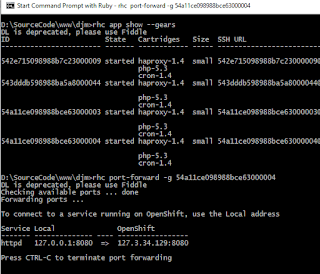
This post would describe how we deploy a Yii application into Openshift Origin. It should also work in Openshift Enterprise and Openshift online. Challenges PHP-based application that runs in a Gear must not write to the application directory, because it is not writable. Openshift provides a Data Directory for each gear, which we could use for the purpose of writing assets and application runtime log. For the case of load-balanced application, error messages written to application log is also stored in multiple gears, making troubleshooting more complex than it is. Solution Use deploy action hook in order to create directories in the data directory and symbolic links to the application. Change the deploy script to be executable, in Windows systems without TortoiseGit we need to do some git magic. Create this file as .openshift/action_hooks/deploy in the application source code. If your application is hosted using 'php' directory in the source code : If your a...

Learn Rails on Windows, part 1

Background Ruby on Rails is a very well known framework, inspiring many frameworks created following Rails ways of organizing a web application. The frameworks I have used that are similar to Rails are : In PHP : CakePHP, CodeIgniter, Yii Framework  In Java : Spring Roo And it seems also being used in Openshift Origin for the implementation of Origin's web console and broker API. That and combined with our need to run Openshift Origin in our private cloud seems a good reason to learn Rails,  The tutorial Currently I am following the Ruby on Rails tutorial by Michael Hartl ( link ). The book strongly encourages using Linux based environment for development, but I am used to work from my Windows machine, so I tried to do development from my Windows Laptop. Preparation I installed the x64 version of Ruby 2.0.0 installer in  http://rubyinstaller.org/downloads/ for my Windows 8.1 system. I have cases that the 32 bit installer doesn't work for 32-bit Wi...

Openshift Log Aggregation And Analysis using Splunk

Image
Splunk is one of popular tools we use to analyze log files. In this post I would describe how to configure an openshift cluster to send all of the platform log files (mind that this excludes gear log files) to Splunk. Configure Splunk to listen on TCP port From splunk web console home, choose 'Add Data', 'monitor', 'TCP/UDP', fill in port 10514 (TCP), click 'Next', select sourcetype Operating System - linux_messages_syslog. Configure Rsyslog Forwarding These steps should be done in every openshift node, openshift broker and console. As root, create an /etc/rsyslog.d/forward.conf file  as follows (change splunkserver to your splunk server IP, and the @@ means TCP, instead of @ for UDP) $WorkDirectory /var/lib/rsyslog # where to place spool files $ActionQueueFileName fwdRule1 # unique name prefix for spool files $ActionQueueMaxDiskSpace 1g   # 1gb space limit (use as much as possible) $ActionQueueSaveOnShutdown on # save messages to disk on sh...

Openshift Origin - Gear process hangs and ps as root also hangs

Image
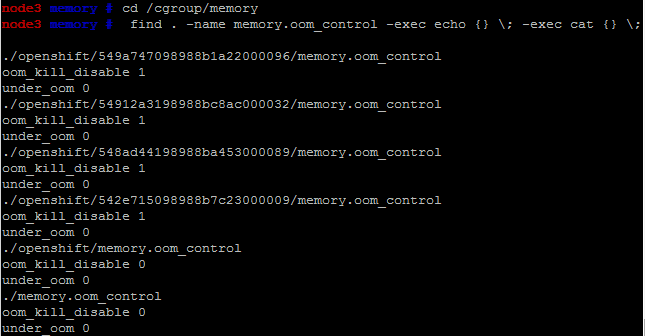
Background A few months ago we installed openshift origin cluster in a few of our servers. We have tried openshift M3 with good results. Upgrading to M4 and deploying several live apps there, we found gears that hangs each week or two, that cannot be resolved by stopping and starting the gear. After the third time this is getting troublesome. Symptoms - Application URL doesn't respond - haproxy-status URL shows gears in red status before eventually hangs itself - Full processlist done by root in the node will hang when the process in question is being printed Investigation Before we understood the root cause, restarting the VM is sometimes the only solution if the problem occurs. Strace-ing the hanging ps shows that ps is stopped when trying to read some memory. A few instances of the problem 'heals' by itself after one day. In some instances killling the process with the cmdline anomaly will solve the problem. The real eye opening is the blog post...